
Hey there, how can we help?
Find the answers to your questions.
If you cannot find answer then contact us.
-
-
- Can I import mixed (different file format) scan data files in one Undet project?
- Can I index terrestrial scanning data (as. example. Building) selecting “Monuments, buildings & interiors modelling projects” type?
- Can I scale / resize point clouds with Undet indexer?
- Does Undet project support large coordinate system (State, airborne LiDAR)?
- How much cost Undet indexer?
- How to move / copy Undet project?
- How to select the proper project type?
- Importing a Cyclone IMP, LGS point cloud file to Undet
- Undet Indexer stops during project creation (out of memory)
-
-
-
- How to change SketchUp Graphics Engine?
- Keeping Your Undet for SketchUp Up-to-Date: A Guide to Checking and Updating
- I'm trying to run Undet for SketchUp with NVIDIA Quadro graphics card, but I can't load point cloud data
- When I open an Undet project my clipping box is empty? Why?
- How to hide clipping box in SketchUp
- Can I scale / resize point clouds with Undet for SketchUp?
- Do Undet projects support large coordinate systems (State, airborne LiDAR)?
-
- System requirements
- Coordinate System management
- Data Classes Right Mouse click Menu
- Export Clipping Box
- Graphical user interface and control
- Software Overview
- Undet Clipping Box toolbar
- Undet Colouring toolbar
- Undet Density toolbar
- Undet Project Management toolbar
- Undet References toolbar
- Undet Scenes toolbar
- Undet Texturing toolbar
- Undet Browser with Undet for SketchUp
- Undet Snapping toolbar
- Undet Modelling toolbar
- Show all articles ( 1 ) Collapse Articles
-
- Automated feature and ground surface extraction from unclassified point clouds
- How to manage point cloud density and clipping box
- How to Model from Point Clouds in SketchUp 2?
- How to Model from Point Clouds in SketchUp?
- How to move and rotate point cloud using coordinates transformation tool
- Overview | Point clouds in SketchUp
- Point clouds scan data management and grouping directly in SketchUp
- Regular SketchUp scenes enriched with point clouds
-
-
- System requirements
- Undet For AutoCAD help
- Graphical user interface and control
- Undet palette Project tab
- Undet palette View Sections tab
- Undet palette Data files tab
- Undet palette Logic Classes tab
- View section, Data files and Logic classes list
- Visibility management tools block
- View modes and coloring modes
- Deformation and ortho block
- Automatic feature extraction block
- Meshing and Draping block
- Coloring Settings
- Section extrusion block
- 3D Viewer
- True Scan View
- Work plane (UCS) block
- Undet Browser with Undet for AutoCAD
- Roll-out & Export Function in Undet for AutoCAD
- Show all articles ( 5 ) Collapse Articles
-
- 3D modeling from point cloud data
- Automatic feature extraction functionality
- Building elevation drawing workflow from point clouds
- Data files grouping and coloring
- Data files quality check
- Deformation analysis
- Floor plan drawing workflow from point cloud data
- Getting Started (Software concept)
- Ground mesh creation and management basics
- How to create a ground surface mesh from UAV point cloud data
- How to start
- Meshing & Texturing
- Smart Sections tools
- TrueView Navigation & Automated Feature Extraction
- UNDET Browser functionality in Undet for AutoCAD
-
-
- How to set up Undet point cloud project in Revit
- How to load the 3D point cloud of Undet for Revit
- How to load the Undet point cloud project when starting a new Revit project.
- How to load an Undet point cloud project when an RCP (Recap) file is already attached to the Revit model.
- How to manually align an Undet point cloud project to a Revit model when there is no RCP (Recap) file attached or the model coordinates have been changed.
- How to create a model inspection report based on Undet Browser
-
- System requirements
- Graphical user interface and control
- Add Slice dialog (main tools for point cloud management)
- Coordinates block
- 3D Point Cloud block
- Analysis block
- Purge block
- Modelling Tools Block
- Warnings block
- Support block
- Undet Browser with Undet for Revit
- Undet for Revit: 360° Panorama Positions & Sync Browser (MMS)
-
- How to get started with Undet for Revit
- Introduction to Slice Manager in Undet to create point cloud images
- Interaction with Undet Browser (point cloud viewer)
- Surface Analysis tool to inspect the accuracy of modelled elements
- Decimate and Transparent tools in Undet Slice Manager
- How to create accurate Revit Families using Undet point cloud images
- Undet tools for 3D point cloud (RCP file)
- How to delete all Undet point cloud images at once
- Batch Processing tools in Undet for Revit
- Fit Wall Tool
- Topo Creation and Topo Projection
- Model Inspection QC Report
- Spot Elevation tool
- Align Walls and Columns (new tool)
- Create Views (new tool)
- Fit Opening for Windows & Doors (new tool)
- Warning Manager (new tool)
- Profile Maker (new tool)
- Fit Column (new tool)
- Auto Floors and Ceiling (new tool)
- Snap Floor (new tool)
- Show all articles ( 6 ) Collapse Articles
-
-
- System requirements
- Software suite UI: ARES Commander and Undet
- ARES Commander | General User Interface & user manual
- Undet tools | Undet TAB
- Undet tools | Floor Plans TAB
- Classic toolbars of Undet tools
- Additional Undet the right mouse click menu
- Undet Browser integration for faster workflow
- Undet shortcuts for ARES Commander
- Snapping to point cloud points
-
- How to create and load Undet Project in ARES Commander
- Mastering basic Undet features for efficient point cloud management in ARES Commander
- Setting up drawing plane (UCS) for building facades vectorization in ARES Commander
- Setting up drawing plane (UCS) for floor plan vectorization in ARES Commander
- Efficient floor plan creation using specialized point cloud tools and workspace in ARES Commander
- Simplify point cloud management with Undet Browser Integration
- Snapping to point cloud points in ARES Commander
- Controlling point cloud density with advanced settings
- Mastering point cloud clipping with advanced settings
- Undet project coordinate transformation tools for georeferenced point clouds
- Undet tools for ARES Commander to speed up drawing annotations from Point Clouds
- WORKSHOP | Point Cloud to CAD Conversion
-
-
- Graphical User Interface and Control
- Undet Browser with Undet for AutoCAD
- Undet Browser with Undet for Revit
- Undet Browser with Undet for SketchUp
- AWS S3 Project Management with Undet Browser
- Setting Up Your Amazon S3: A Step-by-Step Guide
- SLAM Viewer for Navvis & Trimble | Undet Browser
- Undet Browser with Undet for Ares Commander
- Undet for Revit: 360° Panorama Positions & Sync Browser (MMS)
-
- Intro to Undet Browser - powerful yet simple-to-use point cloud viewer
- Webinar: Undet Browser for Revit
- Webinar: Undet Browser for SketchUp
- Webinar: Undet Browser for AutoCAD
- Undet Browser tools for ARES Commander to speed up drawing annotations
- Undet Browser tools for AutoCAD to speed up drawing annotations
How to transfer your Undet license to another PC
Last Updated On
Print
0
0
< Back
How to transfer your Undet license to another PC
There are two ways to move your Undet license to a different computer. In both cases you free up the license on the first machine, then activate it on the new one using the same activation code.
Option 1. Directly in the plugin
Use this when you still have access to the machine the license is currently active on.
- On the current machine, open the Undet tab and open the License Manager.
- Click Deactivate License. This releases the license from that computer.
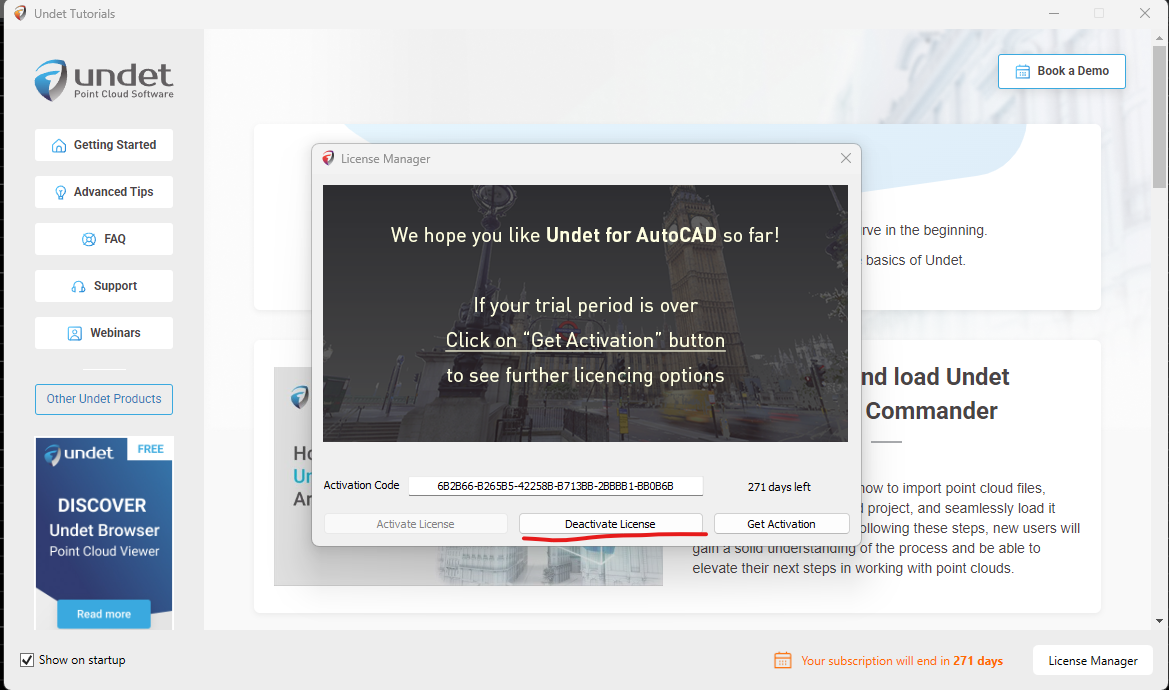
- On the new machine, open the License Manager, enter the same activation code, and click Activate License.
Option 2. Through the portal
Use this when you no longer have access to the old machine, or prefer to manage it online.
- Log in to license.undet.com.
- Go to Licenses, find the license you want to move, open its Actions menu and click View Activation.
- After Activations opens, find the activation you want to move, open its Actions menu and click Delete.

- On the new machine, open the License Manager, enter the same activation code, and click Activate License.
The activation code stays the same across both machines. You are only moving where it is active, not changing the code.
Was this article helpful?